We just rolled out a big upgrade to the Katalisx editing experience. Our editor now runs on Tiptap, which gives you a much better way to format letters without making the workflow feel heavy or complicated. The goal was simple: keep the editor fast and easy to use, but give you more control over how your final document looks.
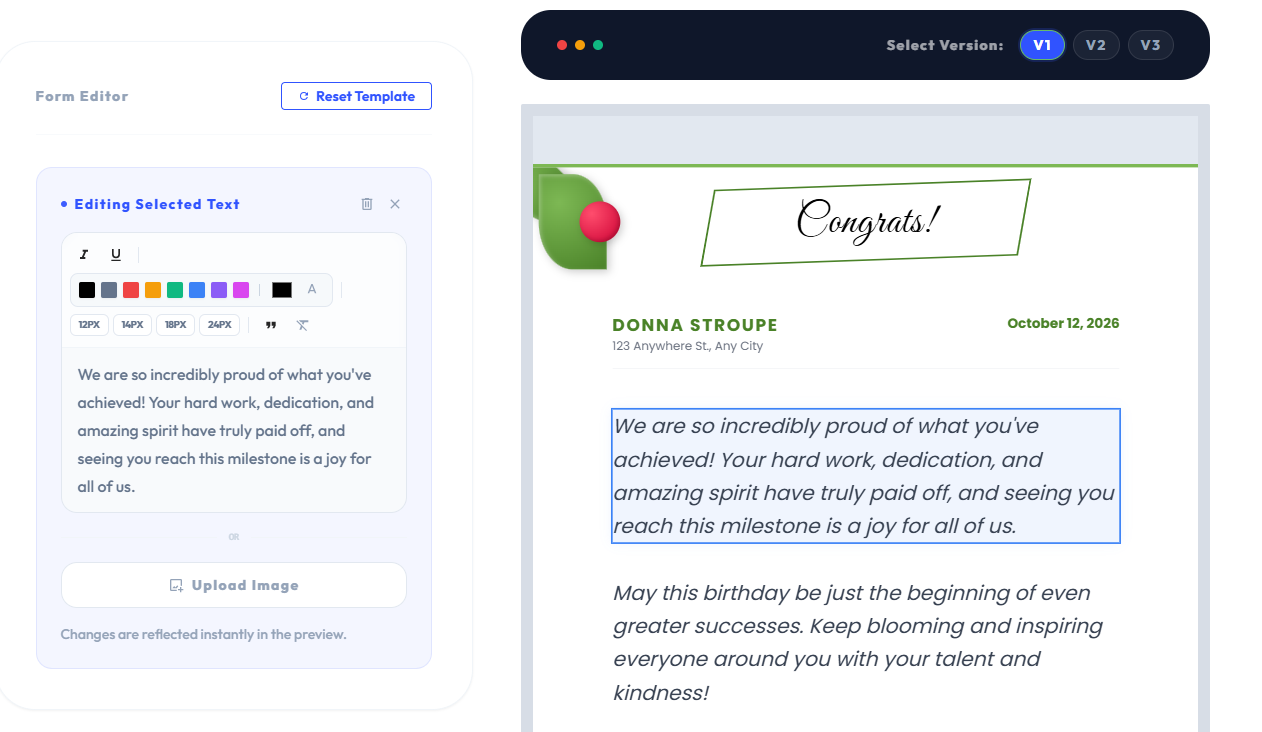
The biggest difference is that editing now feels a lot more flexible. When you select a text block, you can apply formatting more naturally and shape the content the way you want instead of being limited to plain text only. That means it is easier to emphasize important lines, clean up structure, and make the letter feel more polished before you export it.
Lists Are Finally Easier to Use
One of the most useful improvements is proper list support. You can now add bulleted or numbered lists directly inside editable blocks, which is helpful when you need to organize points clearly inside a letter. This is especially nice for responsibilities, milestones, next steps, or anything else that reads better when it is broken into a clean list.
We also added better color controls. You can choose from a professional preset palette or pick your own color when you need more flexibility. So if you want your letter to match a brand color, highlight a key line, or just add a little personality, you can do that much more easily now.
Font size control is better too. Instead of being stuck with one text scale, you can now adjust sizes more intentionally so headings, disclaimers, and supporting details feel more balanced on the page. The result is a cleaner visual hierarchy and a letter that feels more designed instead of flat.
Behind the scenes, this upgrade also helps the editor produce cleaner HTML, which means the preview and final PDF stay much closer to what you see while editing. That matters because formatting is only useful if it stays consistent all the way through export. This update gives us a better base for future improvements too, so adding more advanced editing tools later will be much easier.
Overall, this makes Katalisx feel less like a plain text form and more like a real document editor built for letters. You still get the speed and simplicity of template-based editing, but now with much better control over the final result.